
A WhatsApp service reminder helps a customer remember an agreed or recommended next service. For the business, the important part is maintaining an accurate due date and a clear next action. A message sent on schedule is only useful if the customer, service item and timing are still correct.
This guide is designed for businesses such as appliance servicing, maintenance teams and repair workshops. It explains how to organise reminders for existing customers without treating every past contact as an automatic sales opportunity.
Service reminders, appointment reminders and campaigns are different
An appointment reminder refers to a booking that already has a date and time. A service-due reminder tells a customer that it may be time to arrange the next service. A marketing campaign promotes an offer to a selected audience. These messages have different purposes and should not share the same operational checklist.
For example, a maintenance team might know that an item is due for its next agreed service in October but not yet have a visit booked. Its reminder should invite the customer to discuss a slot, rather than say a technician will arrive on a specific day.
Choose the right due date before writing the message
Use the service agreement, the customer’s request or the appropriate product guidance to set the interval. Do not guess a maintenance schedule just because a monthly reminder is easy to automate. Different items and usage patterns can require different timing.
- Identify the service item clearly enough to distinguish it from the customer’s other items.
- Record the last completed service where relevant.
- Record the agreed next due date and the basis for that date.
- Choose how much advance notice the customer needs to make a booking.
- Confirm the contact details and the customer’s communication preferences.
Keep the record proportionate. A useful item reference might be a customer-friendly description such as “office reception unit”. Do not collect additional personal or sensitive information merely because a notes field is available.
Use a one-time reminder for an individual task
A one-time reminder fits a customer who asks to be contacted about a single next step, or a service whose future schedule is not yet known. In Waflo, CRM → Service Reminders lets you choose a customer, title, due date, send time and days before. The service or product field can be left empty for a general reminder.
Review the message and date together. “Please arrange a visit next week” is confusing if the reminder will not be sent until the due date. If the customer changes the plan before the message is due, update the reminder rather than relying on staff to remember the exception.
Schedule a one-time service reminder in Waflo
Use a recurring plan for a repeatable service cycle
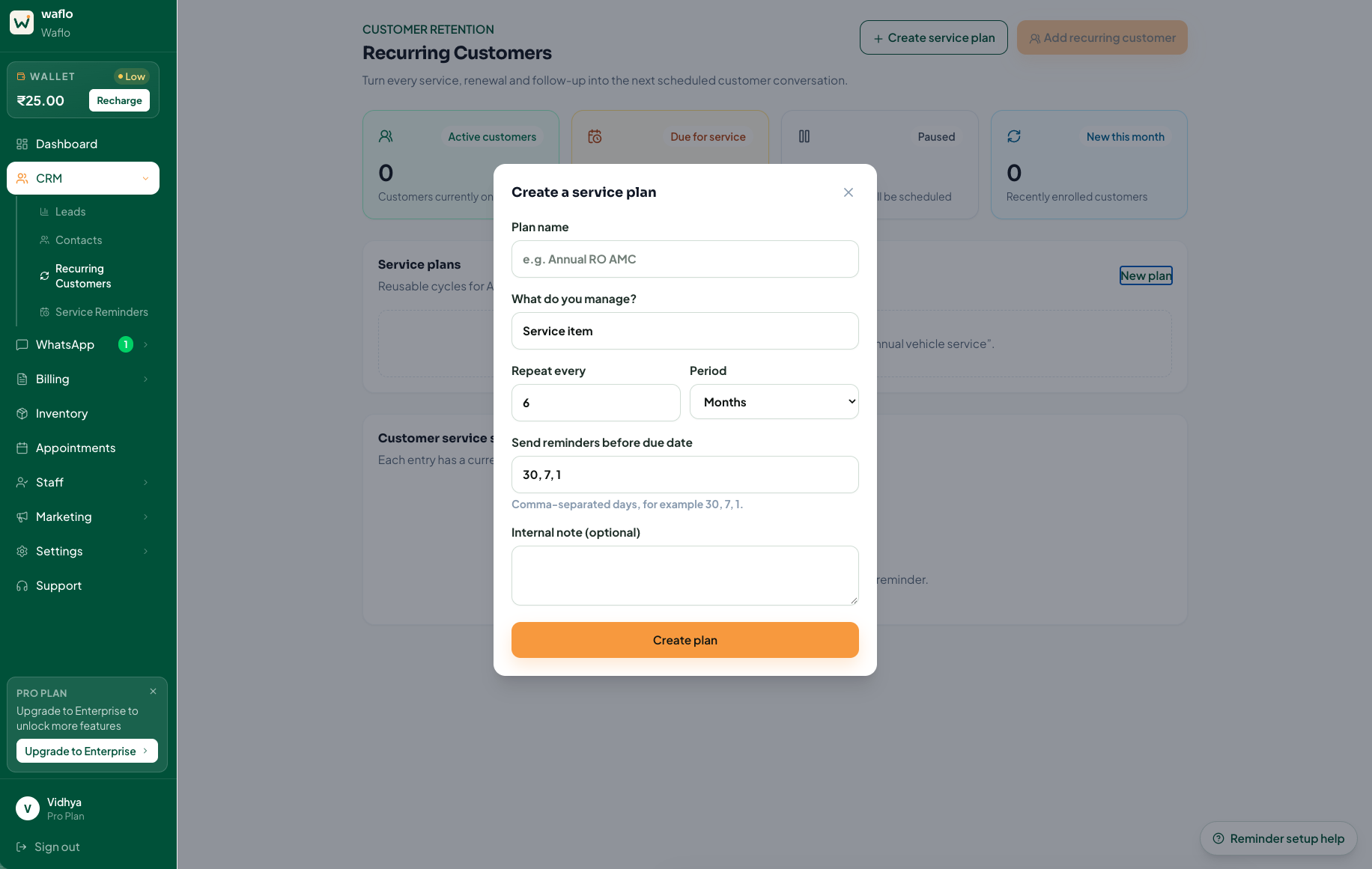
When multiple customers follow the same type of cycle, a reusable service plan can make the setup more consistent. Waflo’s Recurring Customers area supports a plan with a service description, repeat period and reminder days before the due date. A customer is then enrolled with a service item and first due date.
- Open CRM → Recurring Customers and choose Create service plan.
- Give the plan a name your team can recognise and describe the service item.
- Set the repeat period and advance reminder timing based on the actual service arrangement.
- Choose Add recurring customer, select the plan and customer, and enter the item and first due date.
- Review the Customer service schedule and the current reminder before depending on the automation.
Read the recurring-customer setup guide
Three service reminder messages to adapt
A service is coming due
Hello [Name], our record shows [service/item] is due around [date]. Would you like us to check available service slots? If the service has already been completed or your plans have changed, please let us know.
Example message — personalise before use
A customer requested contact in a particular month
Hello [Name], you asked [Business] to reconnect in [month] about [service]. Is this still a useful time to discuss it, or should we update the reminder?
Example message — personalise before use
The due date needs checking
Hello [Name], we are reviewing the next service date for [item]. We currently have [date] recorded. Please let us know if this needs changing before we arrange the next step.
Example message — personalise before use
These are original wording examples, not approved templates. Use the message that matches the customer’s circumstances and replace every bracketed field before sending.
Get opt-in, respect opt-outs and use approved templates outside the WhatsApp Business Platform’s 24-hour service window. Check the appropriate category before submitting a template.
Read WhatsApp’s Business Messaging Policy
Keep the schedule accurate after each response
A customer may have replaced the item, used another provider or asked to delay the service. Treat those answers as changes to the record. Do not continue sending the original reminder simply because the schedule still exists.
Waflo’s recurring-customer screen includes completion, pause and resume actions. Use them to reflect what actually happened, and review the next due date afterward. Marking work complete should mean the service was completed, not merely that a message was delivered.
- Booked: record the agreed appointment and make the next action clear.
- Deferred: confirm when contact will be useful and update the schedule.
- Already completed: check the record and revise the next service date if appropriate.
- No longer relevant: pause or remove the schedule according to your business process.
- No reply: review the circumstances before deciding on another contact attempt.
A weekly review that is easy to maintain
Review customers with services due soon, replies awaiting action and schedules that have been paused. Track how many due services became bookings and how many records needed correction. These are useful operational measures; they do not require claiming that every reminder caused an additional sale.
Frequently asked questions
Can I use the same interval for every customer?
Only when the actual service arrangement supports it. A shared plan is a convenience, not a reason to ignore different service requirements or customer preferences.
What if the service is overdue?
Confirm that it is still needed and that the customer wants contact. Update inaccurate records before adding further reminders. Avoid language that implies an appointment or payment obligation that does not exist.
Should a service reminder include a promotional offer?
Keep the purpose clear. A reminder about a service date and a sales promotion are different communications. Review the intended message and template category rather than adding an offer to every reminder.
Written by Waflo Team
Explore more articles