
A salon appointment reminder on WhatsApp should answer three questions quickly: what is booked, when should the customer arrive, and what should they do if their plans change? A reminder is more useful when it makes changing a booking straightforward instead of simply announcing that the appointment is tomorrow.
This guide covers a practical booking-to-visit workflow for salons, beauty parlours and studios. The templates are original examples to adapt, not approved WhatsApp templates. Use your real service names and scheduling rules, and check the booking before sending.
Start with an accurate booking record
Reminder quality depends on the information underneath it. If a customer changes the service duration or moves from one stylist to another, update the appointment first. Otherwise even a well-written reminder can confidently deliver the wrong details.
- Customer name and correct contact number.
- Booked service and realistic duration.
- Confirmed date, time and branch location.
- Relevant staff member or resource, where applicable.
- A clear way to request a change or cancellation.
For a salon with more than one location, include the branch name rather than assuming that the customer knows which one. If the booking involves preparation, share only instructions that your team has confirmed are appropriate for that specific service.
A practical reminder schedule to test
Begin with a confirmation after booking and one reminder before the appointment. A day-before reminder gives a customer time to flag a change; a same-day reminder may help for selected bookings, but is not necessary for every visit. Treat timing as a starting hypothesis, then review it against your customers’ responses and your opening hours.
Avoid stacking overlapping reminders from different staff members and systems. Give one person responsibility for reviewing the schedule, handling replies and making sure a changed appointment no longer appears as an unchanged booking.
Template 1: booking confirmation
Your booking is recorded, [Name]: [service] at [Salon, branch], [day and date], [time]. If any detail needs changing, reply here and our team will help. We look forward to seeing you.
Example message — personalise before use
Send the confirmation only after the slot has actually been booked. A customer asking whether a time is available is not the same as a confirmed appointment.
Template 2: day-before reminder
Hello [Name], a quick note about your [service] at [Salon, branch] on [date] at [time]. Does the booking still work for you? Please tell us if you need to move it so we can check another slot.
Example message — personalise before use
Use an exact date even when you say “tomorrow” elsewhere. Customers may read a message late, and a specific date is easier to verify than a relative reference.
Template 3: same-day reminder
[Name], we have your [service] booked for [time] today at [Salon, branch]. You can find us at [short address]. If you are delayed, please reply so the team can advise on the schedule.
Example message — personalise before use
Do not promise that the salon can always accommodate a late arrival. The reply should give the team an opportunity to discuss realistic options.
Template 4: a rescheduling reply
Thanks for letting us know, [Name]. We’ll check another time for your [service]. Which day and approximate time would suit you? We’ll confirm availability before moving the booking.
Example message — personalise before use
This wording avoids claiming that a new slot is reserved before someone checks it. After agreeing a new time, update the appointment and send the revised details.
Template 5: after a missed appointment
Hello [Name], we weren’t able to see you for the [time] booking today. If you would like another appointment, let us know your preferred day and we can check availability.
Example message — personalise before use
Keep this separate from promotions or a repeated sales sequence. The purpose is to clarify whether the customer wants to rebook, not to make them feel guilty for missing a visit.
Set up salon appointment reminders in Waflo
Waflo’s appointment setup includes service types, duration, a public booking page and reminder timing. Access depends on the active plan. Confirm your WhatsApp connection and the relevant appointment message templates before using the workflow with customers.
- Open Appointments → Services / Types. Add or review the service name, duration and customer-facing description.
- Check whether a service can genuinely handle multiple bookings in the same slot before enabling that option.
- In Settings, set the public booking page name and save its active status. Test the link before sharing it.
- Under Appointment automation, enter the reminder hours you want to test. Waflo’s guide uses comma-separated hours, such as 24, 1, as an example.
- Review the assigned appointment template and test the setup with a controlled booking before relying on it.
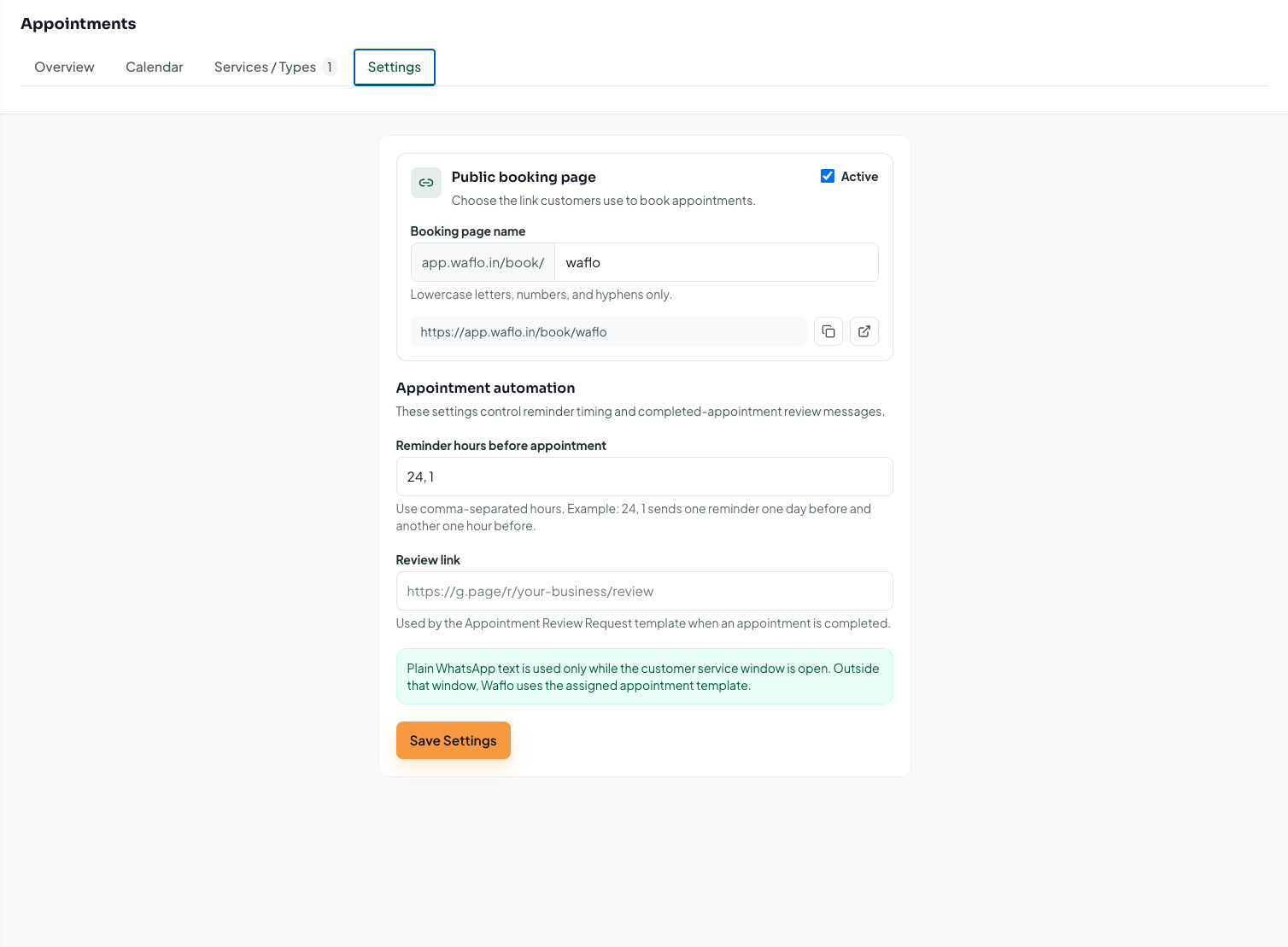
Follow the appointment setup and booking-link guide
Get messaging opt-in and honour opt-outs. WhatsApp Business Platform reminders outside the 24-hour customer-service window need approved templates.
Read WhatsApp’s Business Messaging Policy
Handle replies as part of the reminder workflow
A reminder that receives “Can I come later?” has created work for the team. Decide who watches for those replies and how they update the calendar. A confirmation request is incomplete if nobody reviews the answer before the appointment.
At the end of the week, compare confirmed bookings, completed visits, cancellations and missed appointments. Note how often customers used reminders to request a change. Look for operational improvements rather than promising a fixed reduction in no-shows.
Frequently asked questions
Should every customer receive two reminders?
No. Start with the smallest useful schedule. Consider how far ahead the booking was made and whether a second reminder adds information. Review feedback before increasing frequency.
Does a reply automatically reschedule an appointment?
Do not assume it does. In this workflow, staff review the request, check availability and update the appointment. Test any separately configured automation before depending on it.
Can I also remind customers about their next visit?
Waflo’s service setup includes a return-reminder option for a recommended next visit after completion. Keep that separate from reminders about an already-booked appointment, and check the relevant settings.
Written by Waflo Team
Explore more articles