
A useful WhatsApp lead follow-up message connects to something the customer has already asked and makes the next step easy. “Any update?” puts all the work on the recipient. A message that names the question, offers relevant help and asks one specific question gives them a clearer reason to reply.
The examples below are original starting points for small businesses handling genuine enquiries. Replace the bracketed details, check what has already been discussed and choose only the message that fits the conversation. They are writing examples, not pre-approved WhatsApp templates or guaranteed conversion tactics.
Before sending a follow-up
- Read the latest conversation so you do not ask for information already provided.
- Check whether a teammate has replied, called or sent a revised quote.
- Name the action you want: clarify a requirement, agree a call or decide whether to close the enquiry.
- Check whether the customer requested a particular contact time or asked you to stop.
Use opt-in contacts and respect opt-outs. Outside the WhatsApp Business Platform’s 24-hour service window, use an approved message template.
Read WhatsApp’s Business Messaging Policy
1. After a customer asks about a service
Use this when the enquiry is clear enough to acknowledge but you need one detail to help. Keep the question narrow; a long qualification form in a chat can make a simple request feel difficult.
Hello [Name], [Your name] from [Business] here. You asked about [service]. To suggest the right next step, could you tell me [one detail, such as your preferred date or location]?
Example message — personalise before use
Record the answer in the lead notes. If the customer is only gathering information, answer the question before pushing for a booking.
2. After sharing a quotation
Use this after the customer has had a reasonable opportunity to read the quote, or at the follow-up time you agreed. Reference the version or date so there is no confusion about which offer you mean.
Hello [Name], following up on the [service] quotation we shared on [date]. Is there anything in the scope or inclusions you would like us to explain before you decide?
Example message — personalise before use
A request to change the scope is different from a request for a discount. Record the concern and prepare a revised quotation only if the business can deliver what it promises.
3. When a customer asks you to contact them later
An agreed callback is a stronger reason to follow up than an arbitrary sales schedule. Mention the agreement and give the recipient an easy way to adjust it.
Hello [Name], you asked us to reconnect about [requirement] around [day]. Would [time option] still suit you for a short call, or would another time be easier?
Example message — personalise before use
Set the agreed date in the CRM immediately. If the customer changes it, update the existing task rather than leaving two people to follow up separately.
4. When you need a missing detail
Explain why the detail matters. This helps the recipient understand the next step and avoids a message that feels like a request for unnecessary information.
Hello [Name], we can finish your [estimate/booking request] once we have [specific detail]. It helps us confirm [reason]. You can reply here whenever convenient.
Example message — personalise before use
Ask only for what is needed. If the detail is sensitive or unsuitable for chat, use the appropriate process rather than requesting it in a WhatsApp message.
5. After a consultation or demonstration
Summarise the decision the customer is considering instead of repeating your full sales pitch. Send a relevant next step, not a generic “thanks for your time” followed by another brochure.
Thank you for discussing [requirement] with us, [Name]. We noted that [priority] matters most. Would you like us to prepare [agreed next step], or is there another question we should answer first?
Example message — personalise before use
Before sending, check that the priority accurately reflects the conversation. A made-up summary weakens trust even if the wording sounds polished.
6. When a real deadline affects the decision
Only use a deadline that actually exists, such as the expiry date printed on a quotation. Do not invent limited availability or imply that an ordinary price is about to disappear.
Hello [Name], the quotation for [requirement] is valid until [date]. If you are still considering it, we can clarify the scope before then. If your timing has changed, please let us know.
Example message — personalise before use
7. When it is time to close the loop
If there is no response after the appropriate follow-up, leave a clear end to the sequence. Do not keep moving the same silent lead into a new campaign without a valid reason.
Hello [Name], we’ll pause our follow-up on [enquiry] for now. If you would like to revisit it later, send us a message and we can pick up from here. Thank you for considering [Business].
Example message — personalise before use
Choose a cadence around the customer’s situation
There is no universal number of follow-ups that suits every business. A time-sensitive booking request and a project quotation have different decision cycles. As a starting approach, agree a next contact date during the conversation, send one relevant reminder when due, then decide whether another message adds useful information.
Stop the sequence when the person declines, opts out, completes the purchase or asks for more time. A CRM task is a reminder to review the situation; it should not become an instruction to send regardless of context.
Track follow-ups in Waflo
- Open CRM → Leads and choose the enquiry.
- In Follow-ups, select + Schedule and choose the action, assignee, date, time and notes.
- Write the purpose of the follow-up, not just “WhatsApp customer”.
- After the interaction, record the result in the timeline and update the next action.
- Review overdue tasks and leads without a scheduled follow-up before adding more tasks.
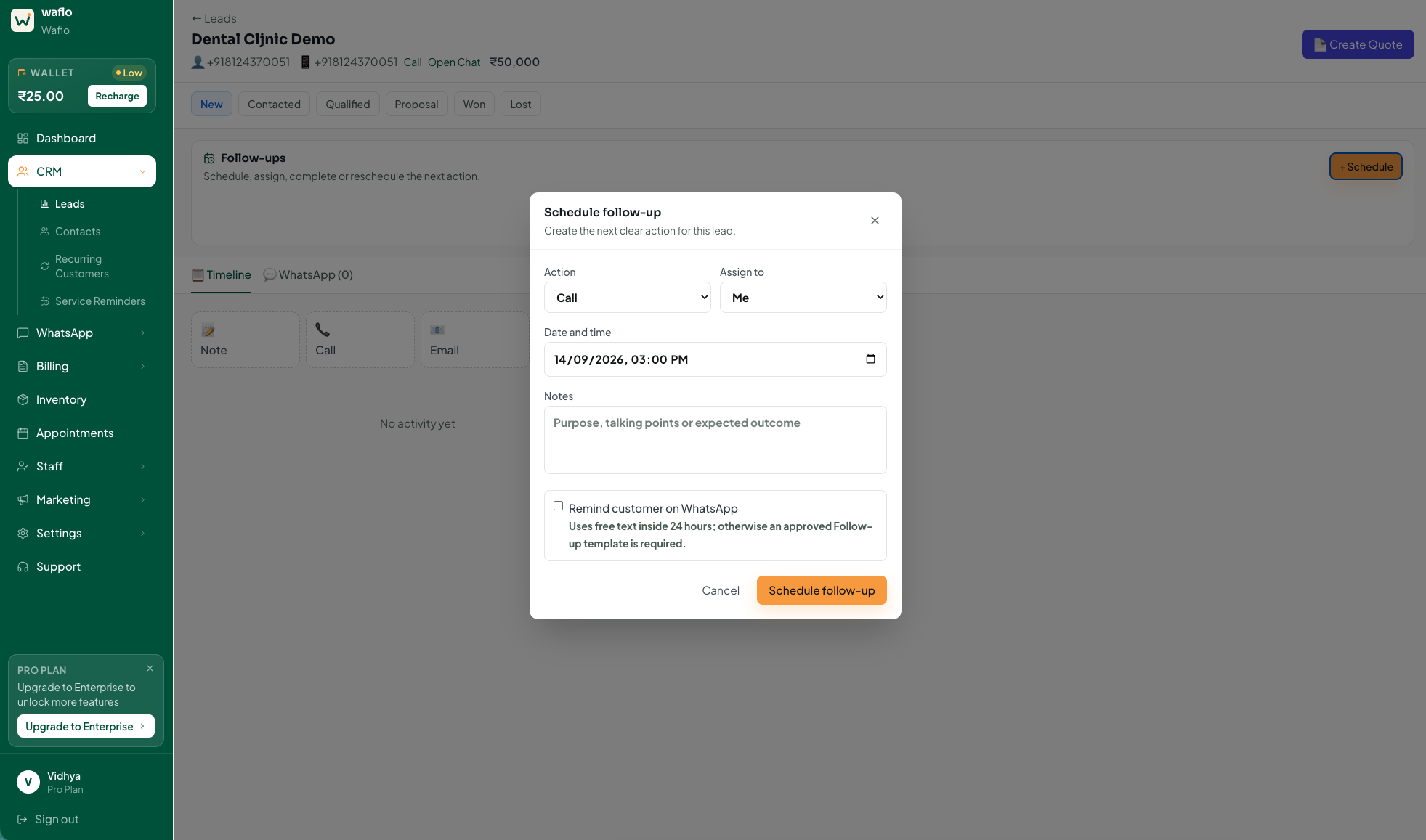
Follow the Waflo lead-management walkthrough
Measure useful replies rather than message volume
For a small pilot, record how many follow-ups produced a relevant reply, an agreed next step or a closed enquiry. Also record requests to stop. Separate “delivered” from “interested”: a delivered message is not proof that the recipient wants to buy.
Frequently asked questions
Can I copy these messages directly into a campaign?
First personalise the wording and check the audience and sending requirements. A writing example is not an approved WhatsApp template. Review variables and approval status in Waflo before using a template.
Should I send a follow-up every day?
Use the customer’s requested timing and the decision involved. Daily repetition without new information is rarely a useful process. Give your team a clear point at which to pause.
What if a lead replies while a follow-up is pending?
Read the reply and update the task before sending anything else. Keep one person responsible for the next action so an older reminder does not restart an outdated conversation.
Written by Waflo Team
Explore more articles