
A useful WhatsApp marketing campaign starts with a reason for a particular customer to hear from you. Sending the same offer to every number in a contact list may be easy, but it does not tell you whether the message is relevant or whether the recipient wants it.
For a small business, a focused campaign is easier to explain, review and learn from. This guide walks through choosing an audience, writing an honest offer, preparing the campaign in Waflo and checking what happened after the send.
Choose one outcome before writing the message
Decide what a useful response looks like. You might want an interested customer to ask for details, request an appointment or enquire about a product they previously discussed. Avoid mixing a festival offer, a review request and an unrelated announcement in one message.
Write a short internal brief: “We want customers interested in [service] to ask about [specific offer] before [real end date].” If the audience, offer or next action is unclear in that sentence, the customer-facing message will probably be unclear too.
Build an audience from relevant customer information
Waflo’s Customer Segments can use CRM tags, contact source, recent contact creation, purchase inactivity, total spending or a never-purchased filter. These filters are only as useful as the records behind them. If purchase history is incomplete, do not interpret “no purchase recorded” as proof that the person has never bought from you.
- Interest-based audience: contacts tagged with a service they actually asked about.
- First-purchase audience: relevant enquiries with no purchase recorded, after checking data completeness.
- Returning-customer audience: customers for whom a new offer is relevant and whose communication preferences permit it.
- Source-based audience: enquiries from a specific channel, where that source is recorded accurately.
Start with one simple audience rule your team can explain. Several overlapping filters may accidentally exclude relevant people or select customers with a very different need. Review sample contacts, not just the size of the segment.
Build and review customer segments in Waflo
Permission is separate from a segment
A CRM tag or past purchase does not establish messaging permission. WhatsApp requires opt-in, respect for opt-outs and approved templates outside the Platform’s 24-hour service window. Match messages to their approved purpose.
Read WhatsApp’s Business Messaging Policy
Make communication preferences part of your pre-send review. A sample offer that includes an opt-out sentence is still only wording; your team must have a working process for acting on replies and excluding recipients from later sends.
Write an offer the customer can understand quickly
- Identify the business, especially when the customer may not recognise the number.
- State the relevant service or product before adding descriptive language.
- Use only a real offer with clear conditions and an accurate end date, if there is one.
- Ask for one action, such as requesting details or checking a booking slot.
- Explain how recipients can tell you they no longer want offers.
Example: an invitation to ask about a service
Hello [Name], [Business] has introduced [service] for customers looking for [specific use]. If you would like the details, reply and our team will help. If you no longer want offers from us, please let us know.
Example message — personalise before use
Example: a genuine time-limited offer
Hello [Name], our [offer] on [service/product] is available until [date], subject to [key condition]. Would you like the details before deciding? Tell us if you prefer not to receive further offers.
Example message — personalise before use
Both examples are original drafts to adapt and review. Do not claim that an offer is personalised unless it really is, or imply that stock is limited without checking. Include the important conditions in the communication instead of revealing them only after a customer responds.
Prepare the campaign in Waflo
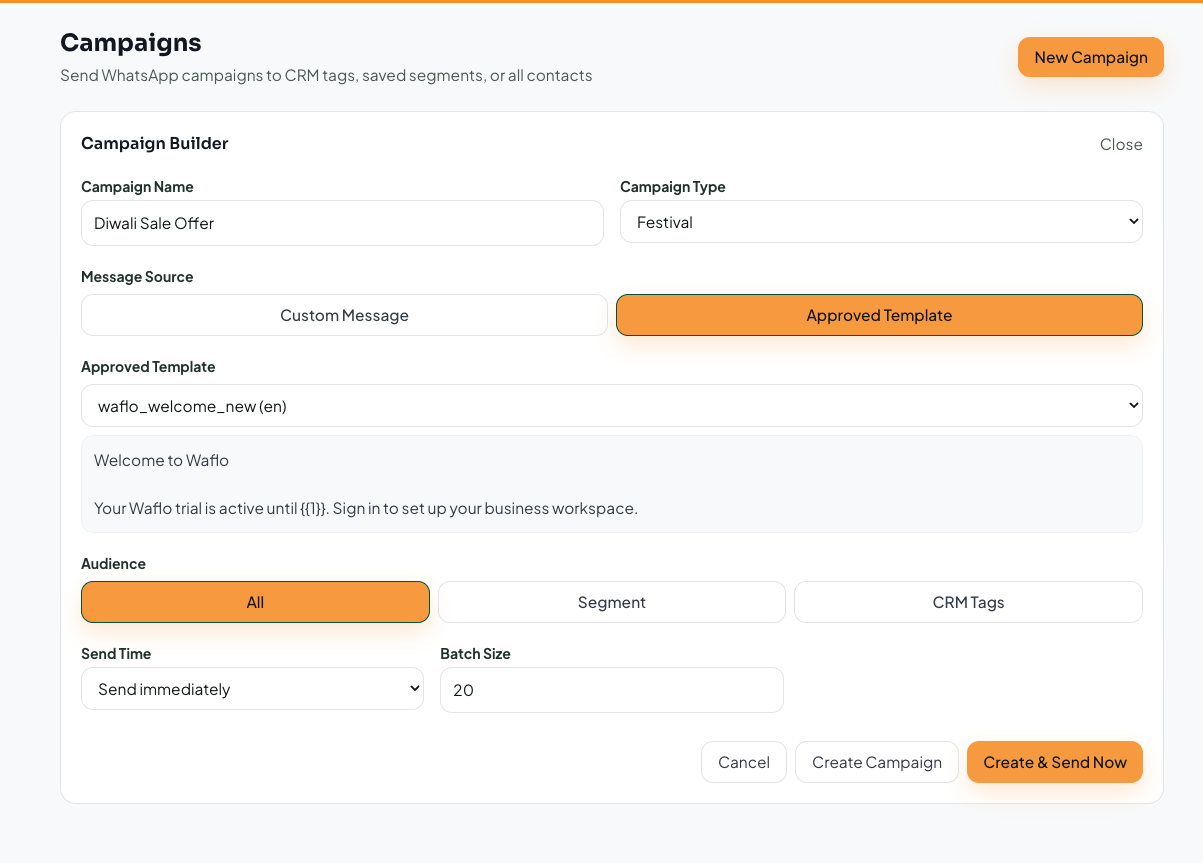
- Open Marketing → Campaigns, select New Campaign, and choose a descriptive campaign name and type.
- Select the message option. Review the approved template and its variables, or the custom text where applicable.
- Choose All, Segment or CRM Tags deliberately. For a targeted campaign, select the saved segment or intended tags and review the audience.
- Choose an immediate or scheduled send time. Check the date, time and batch size before proceeding.
- Use Create Campaign to save without starting an immediate send. Launch or schedule only after the final review.
Follow Waflo’s campaign creation walkthrough
Campaign access, limits and related features depend on the active plan. Check Billing & Plans and messaging credits in your workspace before planning the send. An available campaign screen is not a promise of unlimited sending or free delivery.
Run a pre-send check with another person
- Open the message preview and replace every variable with a realistic sample.
- Check the destination of each link and whether it works on a phone.
- Verify the audience against the offer and communication preferences.
- Confirm that the business can honour the offer and handle the expected replies.
- Name the teammate responsible for incoming questions.
- Keep a record of the campaign’s purpose and what will count as a useful outcome.
Use a small, permissioned test before the wider send. Review the actual customer experience: the business name, message layout, link destination and next step should all agree. Correct anything confusing before scaling the audience.
Measure replies and outcomes, not just activity
Delivery confirms that a message reached its destination; it does not prove interest or a sale. Record meaningful replies, qualified enquiries, bookings or completed purchases where you can verify them. Also track requests to stop and delivery problems.
Compare campaigns with similar audiences and goals. If you change the audience, offer and timing at once, you will not know which change mattered. Where the campaign screen does not provide a metric you need, keep a simple review sheet or record the outcome in the relevant CRM lead instead of assuming it is tracked automatically.
Frequently asked questions
Is a larger audience always better?
No. Start with relevance and permission. A smaller group with a clear reason to hear about the offer can produce more useful learning than a broad, poorly defined list.
Can Waflo help draft campaign copy?
Waflo’s AI Copy workflow can generate campaign text where the feature is available on your plan. Review all claims, prices, conditions and language before using the output.
What should happen when someone replies?
A team member should review the question and record the next action. If the reply becomes a genuine sales opportunity, create or update the lead rather than leaving the outcome buried in a campaign conversation.
Turn campaign enquiries into organised follow-ups
Written by Waflo Team
Explore more articles